

The television
The television is the most important object in the room, because nothing else means anything until something is showing on it. It behaves like a television: it has a power button, a volume control, inputs you switch between, and it shows a blank screen when nothing is reaching it.
The buttons on the set
Section titled “The buttons on the set”All of these are on the set itself, and all of them are also on the TV remote if you would rather not walk over.
| Button | Does |
|---|---|
| Power | Turns the set on and off. A powered-off set shows nothing even if a console is running |
| Volume − / Volume + | Volume for whatever input is currently showing |
| Mute | Silence without changing the volume |
| Source | Cycles the inputs — Composite 1 through 4, the antenna, and VGA |
| Channel − / Channel + | Tunes up and down when the set is on the antenna input |
| Audio mode | Switches between stereo and mono output |
| Aspect | Switches the picture between 16:9 and 4:3 |
| CRT | Turns the CRT effect on and off — scanlines, curvature and phosphor glow |
| 3D | For stereoscopic sources: both eyes, left eye only, or right eye only |
The inputs
Section titled “The inputs”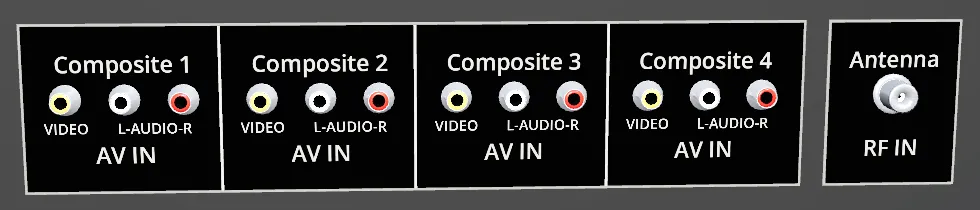
- Composite 1–4 — four full phono rows, so four machines can stay wired up at once.
- Antenna (RF IN) — for an RF switch, or for a real tuner.
- VGA — on sets that have it, for a computer’s DE-15 output.
Which one you see is whatever Source last landed on. A machine on an input you are not watching keeps running.
Wiring is covered in full on plugging things in.
Live TV with an HDHomeRun
Section titled “Live TV with an HDHomeRun”If you own a SiliconDust HDHomeRun tuner with an antenna attached, RetroXR can watch actual broadcast television on it. Set the source to the antenna input and the channel buttons tune through your real local channels.
How it finds the box
Section titled “How it finds the box”Discovery is layered, cheapest and most reliable first:
- An explicit host, if you have named one in
channels.json. - The last address that worked, cached between sessions.
- A UDP broadcast on port 65001 — SiliconDust’s own discovery protocol.
http://hdhomerun.local/discover.jsonover mDNS.
mDNS is last on purpose: it is the flakiest of the four. It has returned a link-local IPv6
address ahead of IPv4 and hung a resolver outright, and Android may not resolve .local
at all. Every other route yields a plain IPv4 address, which always works.
Every URL the tuner hands back is rewritten onto the address that actually answered, for
the same reason — the headset should never have to resolve a .local name while you are
trying to watch something.
Tune the antenna input to a channel with nothing on it and you get snow. That is not a failure state — it is the set telling you it works and nothing is reaching it on that channel. The same picture appears if an RF switch is connected but its console is off.