

Satellaview
In 1995 Nintendo bolted a satellite modem to the underside of the Super Famicom. St.GIGA broadcast games, magazines and radio into it on a schedule, you downloaded them onto an 8M Memory Pack, and what you had not caught by the end of the slot you had missed. The service went dark in 2000, and everything that survives survives because somebody wrote it to a pack and kept it.
RetroXR models all three layers of that, as of v0.5.0.
The three pieces
Section titled “The three pieces”The Satellaview is the object people picture, but it is not the thing you put a game into. Three separate objects stack up:
| Piece | What it is | Where it goes |
|---|---|---|
| Satellaview | The base station — tuner and modem, two lamps, no slot at all | The Super Famicom stands on it |
| BS-X | A Super Famicom cartridge carrying the shell program | Into the console’s cartridge slot |
| 8M Memory Pack | The flash medium a broadcast is written to | Into the BS-X cartridge |
That layering is the real hardware’s, not a simplification. The base station genuinely has no mouth on it — it is a receiver — so the media goes in above it. See expansion hardware for how a stack is assembled.
What you need
Section titled “What you need”- snes9x, which RetroXR selects for you when the stack is built.
- Your
.bsfiles in thesatellaviewfolder of your ROM library. - The BS-X shell program, by either of the two routes below.
Two ways to get a BS-X
Section titled “Two ways to get a BS-X”As firmware. Put BS-X.bin in libretro/system/snes9x/ and the BS-X appears in the
spawn menu as a unit you can spawn like any other. Until it is installed, it is not offered
at all. See BIOS and firmware.
As a ROM in your library. Drop a BS-X .sfc into the same satellaview folder your
.bs files live in — including an English-translated dump, which is how most people
will want to read the town — and spawn it straight from the library. You get the real BS-X
cartridge, with the well in its roof that a memory pack goes into, not a plain slab.
Inside the satellaview folder the extension is what separates the two kinds of file:
a .sfc is the shell, a .bs is a memory pack.
The lamps mean something
Section titled “The lamps mean something”The base station wears POWER and ACCESS, and both report the machine rather than being decoration. POWER follows the console bolted above it. ACCESS is the tuner’s own — the emulated BS-X flips it while data is moving, snes9x reports that over libretro’s LED interface, and the lamp lights because the emulated machine said so.
New in v0.5.0: the LED interface that carries it went into RetroXR’s snes9x fork for exactly this.
8M Memory Packs
Section titled “8M Memory Packs”A pack is a medium, not a game, and RetroXR treats it as one.

Minting a blank one
Section titled “Minting a blank one”A blank pack is something you had to buy — a broadcast needs somewhere to land, and every other platform’s media arrives as a dump of something that already exists. So the Satellaview shelf is the one place in RetroXR that can mint a new medium.
Open SPAWN → Games, find Satellaview, and the button at the top right of its
shelf is + New Memory Pack. Press it and a blank, correctly formatted 8 Mbit pack
appears in your library, ready to receive.
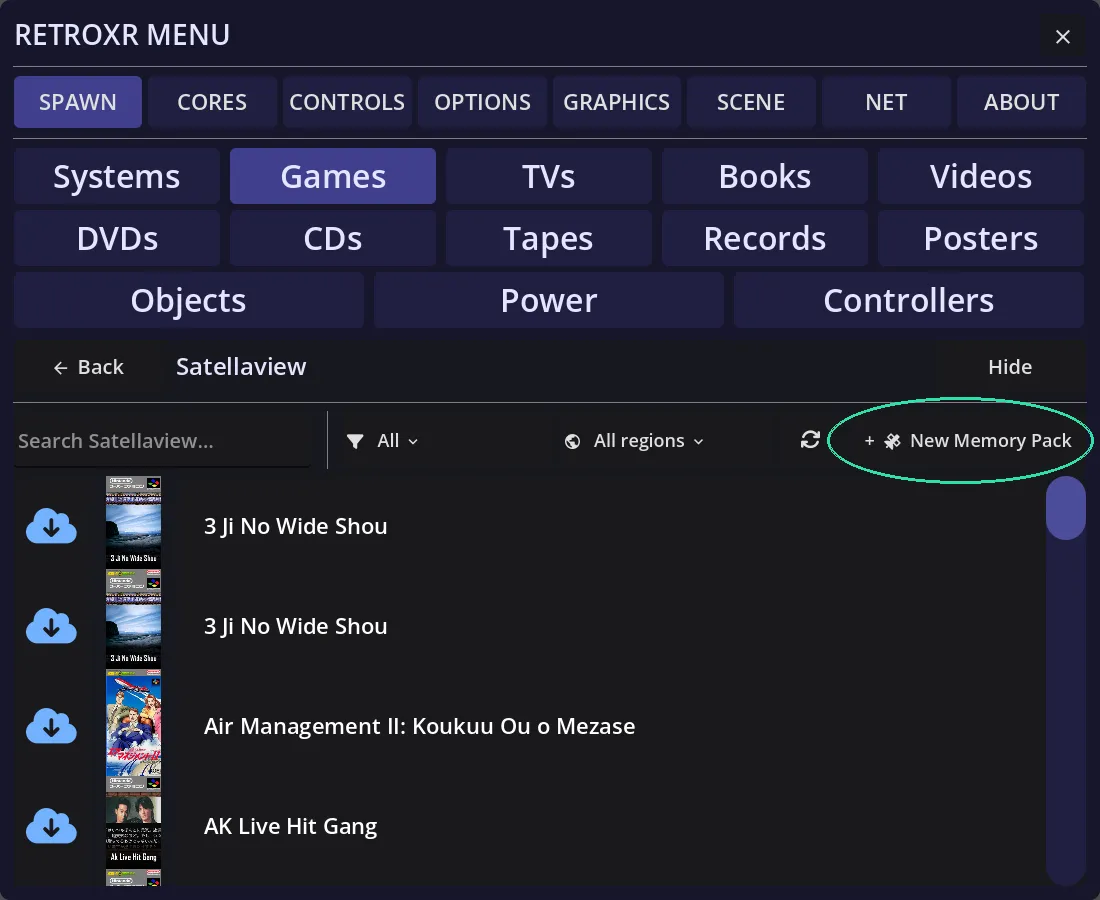
New packs are named for you and simply count up — MEMORY PACK.bs, MEMORY PACK 2.bs,
MEMORY PACK 3.bs — so mint as many as you want to keep transmissions on separate media.
They land in roms/satellaview/ beside everything else, which is where they have to be.
Reading what is on one
Section titled “Reading what is on one”Point at a pack in the room and click the left thumbstick (or press TAB on desktop)
and you get what is written on it — each programme and the blocks it occupies — rather
than the Saves and Achievements list a game cartridge offers.
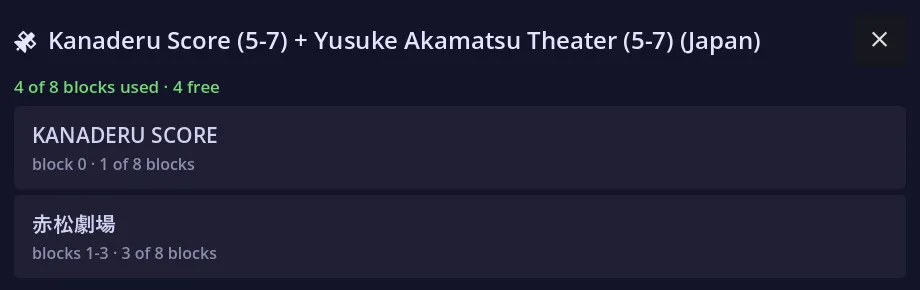
A pack is allotted in eight blocks of one megabit, and the panel shows which programme holds which. The image is re-read every time you open it, because a pack seated in a running BS-X is being written to while you watch.
The list is deliberately read-only — there is no delete. The block-erase behaviour has not been pinned down, and a wrong guess destroys a download that can only be obtained from a live broadcast.
Some programmes need an IPS patch
Section titled “Some programmes need an IPS patch”A few broadcasts cannot start from a dump alone. BS F-Zero Grand Prix is the clearest case: it was a SoundLink title whose music and timing arrived over the satellite during a live event, and with nothing being broadcast it never leaves its opening screen — the CPU ends up executing its own ROM header as code. Grand Prix 2, which was not a live event, runs untouched.
The Satellaview community’s fix is an IPS patch that re-enables the in-game music and lets START move past that screen. Those patches are not RetroXR’s to ship, so it looks for one you have put beside the programme:
roms/satellaview/BS F-Zero ... .bs <- your dump, never written toroms/satellaview/BS F-Zero ... .ips <- the patch, dropped in by handMatch the base name and RetroXR does the rest. Your original is never modified: the
patch is applied to a copy held outside the ROM folder, keyed by a hash of both files, so
replacing the patch rebuilds it on the next launch. A programme with no .ips beside it is
handed to the core untouched, with no copy made at all.
Satellaview+ — the broadcast came back
Section titled “Satellaview+ — the broadcast came back”Satellaview+ is a community project that puts a scheduled Satellaview broadcast back on the air — a real timetable, running now, in the same shape the original service had. Its client keeps a folder of the current transmissions on your PC.
That folder is all RetroXR needs, because a broadcast really is a file appearing where the emulated tuner looks for it.
-
Run the Satellaview+ client on the same PC, and let it fill its
roms/satellaviewfolder. -
Point RetroXR’s sat folder at it, so the two are looking at the same place — the emulated tuner reads a broadcast straight out of that directory.
-
Build the stack — Satellaview, Super Famicom, BS-X cartridge — and put an 8M Memory Pack in the cartridge. A translated BS-X
.sfcsitting in that same folder works here exactly as the firmware copy does, and is the easier one to navigate. -
Power on, walk into the town, and use the satellite terminal to download whatever is being transmitted in this hour’s slot. The ACCESS lamp will tell you it is working.
Whatever you catch is written to the pack, and the pack is yours. Miss the slot and it is gone, which is the point.