

Connecting RomM
RomM is a self-hosted library manager for a ROM collection. If you run one, RetroXR talks to it directly — so instead of copying files into the headset, you browse your whole collection from inside it and pull down only what you want to play.
Saves sync back the other way, so a game you played in the headset carries on where you left off elsewhere.
Pairing, step by step
Section titled “Pairing, step by step”The awkward part of connecting anything in VR is typing a server address and a long API key through a floating keyboard. RomM avoids that entirely: it shows a QR code, and you look at it through the headset’s camera.
-
Open RomM in a browser on your computer and sign in.
-
Click your avatar in the top-right, then Client API Tokens under Library.

-
Click Create. Give the token a name you will recognize —
RetroXRis the obvious one — and leave the permissions alone. RetroXR uses the full set to browse your library, download games and firmware, and write saves back.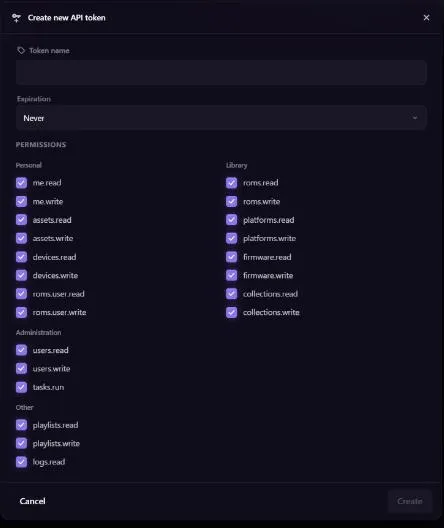
-
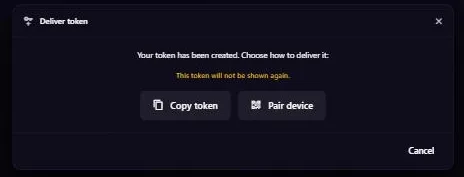
Choose how to deliver it. The token is shown exactly once. Press Pair device — not Copy token, unless you genuinely want to type it by hand.
-
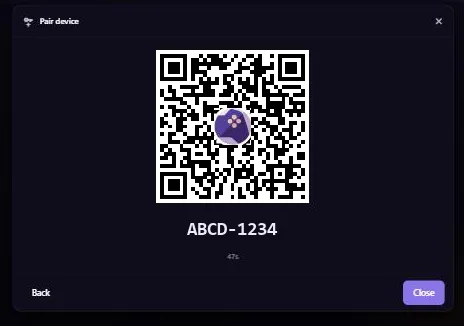
A QR code appears with a short pairing code and a countdown. It is only valid for about a minute, so have the headset on before you get here.
-
In RetroXR, open
OPTIONS→ RomM and start the QR scan. Look at your monitor through the headset. The code carries your server’s address as well as the pairing code, so both fields fill themselves in.
If you would rather not scan
Section titled “If you would rather not scan”The same screen accepts a server URL and credentials typed by hand — either an API token from step 4’s Copy token, or your RomM username and password.
What you get
Section titled “What you get” What you get
- Browse the whole collection from the menu, not just what is on the headset.
- Download individual games on demand, rather than syncing everything.
- Firmware and BIOS files, if your server holds them — see BIOS files.
- Save sync back to the server, including PlayStation memory cards.
Known rough edges
Section titled “Known rough edges”- Very large platforms can be slow to sync. A system with thousands of entries is much heavier than a handful of favorites.
- RetroXR reads your library as individual files, so how your collection is organized on the server affects what you see.